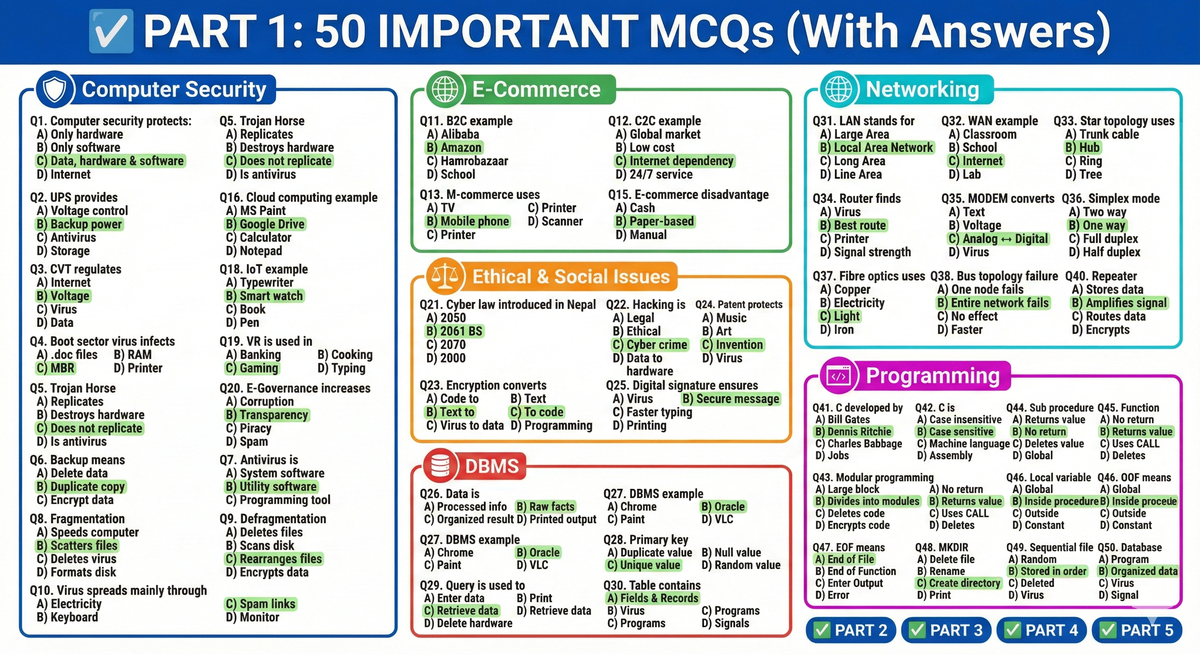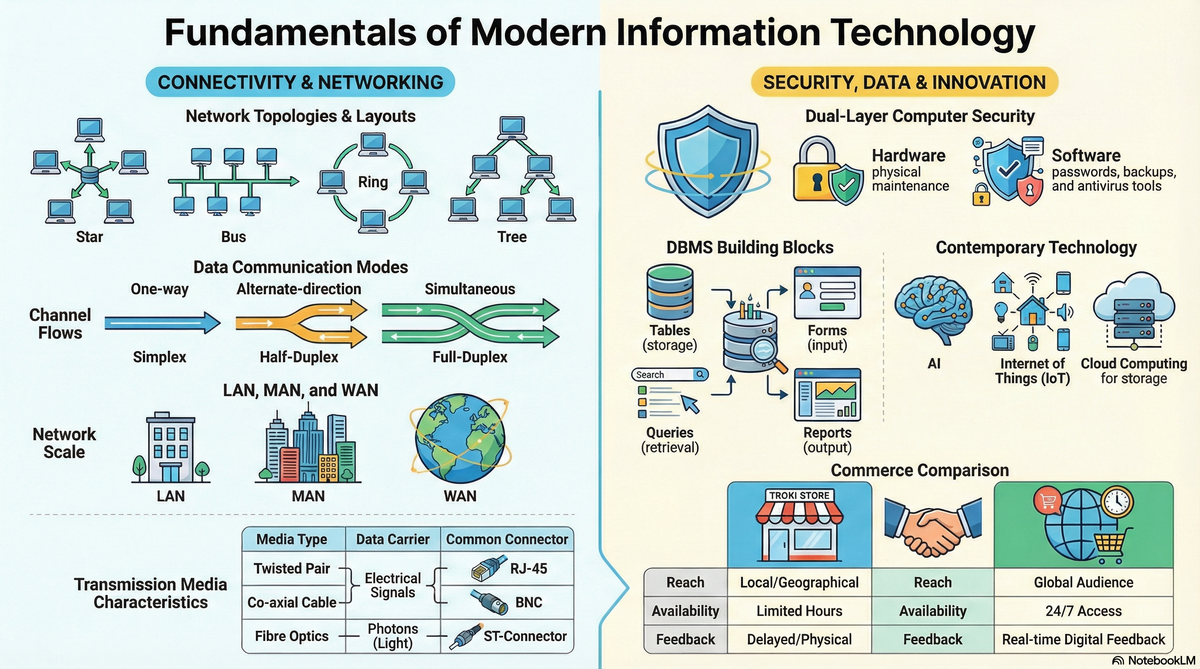
📘 Class 10 SEE Preparation Notes
🖥️ Computer (Complete Revision Guide)
🛡️ Unit 3: Computer Security
🔐 Computer Security
Computer Security refers to the protection of computer data, information, software, and hardware from being damaged, lost, or accessed without authorization.
🖥️ Hardware Security
Hardware Security means protecting computer components and peripherals from physical damage or loss.
Measures of Hardware Security:
- Regular maintenance
- Keeping computer in a dust-free environment
- Insurance coverage
- Protection from fire and theft
- Using power protection devices
- Air conditioning for proper temperature control
💾 Software Security
Software Security means protecting computer data and software from being damaged, corrupted, or lost.
Measures of Software Security:
- Keeping strong passwords
- Keeping regular backups
- Using updated antivirus software
- Defragmentation
- Running scandisk
⚡ Power Protection Devices
Power protection devices manage power supply problems.
🔋 UPS (Uninterruptible Power Supply)
- Provides backup power during electric failures
- Prevents sudden shutdown and data loss
🔌 Volt Guard / CVT (Constant Voltage Transformer)
- Regulates incoming voltage
- Protects from voltage fluctuation
- Does NOT provide backup power
🦠 Computer Virus
A Computer Virus is a malicious program that replicates itself and destroys data, files, and programs.
🧬 Types of Computer Virus:
- Boot Sector Virus
- Infects Master Boot Record (MBR)
- File Infector Virus
- Infects executable files (.exe)
- Multipartite Virus
- Infects both boot sector and files
- Macro Virus
- Infects MS Word and Excel files
- Stealth Virus
- Hides itself from detection
- Trojan Horse
- Malfunctions the system but does NOT replicate
- WORM (Write Once Read Many)
- Spreads itself across networks
⚠️ Causes of Virus Infection:
- Exchanging infected files
- Opening spam emails or suspicious links
- Using pirated software
- Using unauthorized web applications
🛑 Symptoms of Virus Infection:
- Programs take longer to load
- Unwanted messages appear
- File sizes change automatically
- Computer frequently reboots
✅ Precautions Against Virus:
- Use updated antivirus software
- Avoid unauthorized links
- Avoid pirated software
- Keep regular backups
- Use strong passwords
📂 Important Terms
Backup
Duplicate copy of original data used when original data is lost.
Fragmentation
Files are scattered in different sectors of the disk.
Defragmentation
Rewrites scattered files into contiguous sectors to increase disk speed.
Antivirus
Utility software used to detect and eliminate viruses.
Examples:
- AVG
- Norton
- Kaspersky
💳 E-Commerce and M-Commerce
🌐 E-Commerce
Buying and selling goods, services, and information through the Internet.
Types of E-Commerce:
- B2C (Business to Consumer)
Example: Amazon - B2B (Business to Business)
Example: Alibaba - C2C (Consumer to Consumer)
Example: Hamrobazaar
✔️ Advantages of E-Commerce:
- Buy and sell anytime
- Global expansion
- Low operational cost
- No physical store required
❌ Disadvantages:
- Depends on internet
- Prone to electronic fraud
- Technical failure may halt business
🏪 Traditional Commerce vs E-Commerce
| Traditional | E-Commerce |
|---|---|
| Requires physical store | No physical store required |
| Limited to local area | Global audience |
| No real-time feedback | Provides real-time feedback |
| Both are profit-oriented |
📱 M-Commerce (Mobile Commerce)
Extended version of E-Commerce.
Transactions are done through handheld devices like mobile phones.
✔ Highly portable
✔ Widely used
💰 Online Payment
Cashless and paperless transactions using payment gateways.
Examples:
- Credit Card
- Debit Card
- Electronic Fund Transfer
- E-Cheques
Advantages:
- Safe from physical theft
- Minimizes human interaction
🚀 Unit 5: Contemporary Technology
🔬 Contemporary Technology
Latest innovations integrated into daily life.
Examples:
- Video Conferencing
☁️ Cloud Computing
Storing, managing, and processing data on remote servers hosted on the Internet.
Example:
- Google Drive
Benefits:
- Data backup
- Live streaming
- High-speed data transfer
📲 Mobile Computing
Using handheld devices to transfer data over a network.
✔ Highly portable
🏛️ E-Governance
Government services provided electronically.
Advantages:
- Increases transparency
- Reduces corruption
- Encourages public participation
🤖 Artificial Intelligence (AI)
Integrating human thinking and behavior into machines.
Examples:
- Robotics
- Machine Learning
Advantages:
- Handles large data
- Improves decision-making
- Introduces new problem-solving methods
🕶️ Virtual Reality (VR)
Artificial simulated environment giving realistic experience.
Used in:
- Gaming
- Aviation training
🌐 Internet of Things (IoT)
Network of physical devices communicating via sensors and software.
Examples:
- Smart watches
- Alexa
- Tesla cars
Benefits:
- Automates daily life
- Increases efficiency
⚖️ Unit 2: Ethical and Social Issues in ICT
📜 Cyber Law
Law governing cyberspace.
In Nepal:
Introduced on 30th Bhadra 2061 BS
Name: Electronic Transaction and Digital Signature Act
Purpose:
- Control cybercrime
- Legalize online transactions
🧠 Computer Ethics
Moral principles for computer users.
Commandments:
- Do not use computers to commit crimes
- Do not steal data
- Do not publish fake news
🚨 Cyber Crime
Criminal activity using computer or internet.
Examples:
- Piracy
- Hacking
- Phishing
🔑 Key Legal Terms
Intellectual Property Right (IPR)
Protects creations like music and art.
Patent Right
Protects technological inventions.
Digital Signature
Ensures correct delivery of messages over network.
Encryption
Converting readable data into unreadable code.
Decryption
Converting unreadable code back to readable form.
Hacker
Person who enters system without authorization.
🗄️ Unit 7: DBMS (Database Management System)
📊 Data vs Information
Data:
Raw, unprocessed facts
Example: 32, John
Information:
Processed meaningful result
📚 Database
Organized collection of data for quick access.
Examples:
- Dictionary
- Telephone directory
🛠️ DBMS
Software used to manage, store, and manipulate database.
Examples:
- MS-Access
- Oracle
Advantages:
- Prevents duplication
- Secures data
- Allows sharing
MS-Access Elements
Table
Stores data in rows (records) and columns (fields).
Form
User-friendly interface for entering/editing data.
Query
Retrieves data based on conditions.
Types:
- Select
- Action
- Update
- Append
- Delete
- Make-table
Report
Displays results like bills and summaries attractively.
Primary Key
- Unique identifier
- Prevents duplication
- No null values
- Helps establish relationships
DBA (Database Administrator)
Responsible for planning, securing, maintaining, and operating DBMS.
🌐 Chapter 1: Networking & Telecommunication
📡 Communication Modes
- Simplex – One way (TV)
- Half Duplex – Two way but one at a time (Walkie-Talkie)
- Full Duplex – Two way simultaneous (Mobile phone)
🖧 Computer Network
Interconnected computers sharing resources.
Advantages:
- Faster communication
- Resource sharing
Disadvantages:
- Expensive
- Security risk
- Skilled manpower needed
📶 Transmission Media
Wired (Guided):
- Twisted Pair (UTP/STP)
- Co-axial Cable
- Fibre Optics (Uses light/photons)
Wireless (Unguided):
- Microwave (Line of sight)
- Radiowave
- Infrared
🌍 Types of Network
- LAN – Local Area
- MAN – Metropolitan Area
- WAN – Wide Area (Internet)
🔗 Network Topologies
Bus
Cheap but fails if main cable fails.
Star
Central hub, easiest to expand.
Ring
Failure of one device collapses network.
Mesh
Expensive but highly reliable.
🔌 Networking Devices
- Router – Finds best route
- Repeater – Amplifies signal
- Hub – Multi-port repeater
- Bridge – Connects similar networks
- Gateway – Connects dissimilar networks
- MODEM – Converts analog/digital signals
🌐 Internet Services
- E-commerce
- Telnet
- Video conferencing
Web Browsers:
- Google Chrome
- Safari
🏢 Intranet vs Extranet
Intranet – Private network within organization
Extranet – Accessible outside organization
💻 Programming in C and QBASIC
C Programming
- High-level modular language
- Developed by Dennis Ritchie
- Used for UNIX
- Case sensitive
- 32 keywords
Modular Programming
Breaking large program into smaller modules.
Advantages:
- Easy debugging
- Reusable code
- Independent coding
Procedures
Sub Procedure
- Does not return value
- Uses CALL statement
Function Procedure
- Returns value
- No CALL statement
- Library or User-defined
Variables & Parameters
Local Variable – Inside procedure
Global Variable – In main module
Formal Parameter – Declares data type
Actual Parameter – Passes real value
📁 File Handling
Creating, retrieving, adding data to files.
Types:
- Sequential
- Random
Commands:
- Kill
- Name AS
- MKDIR
- EOF
📢 Important Notice for SEE Students
These notes provide foundational concepts directly extracted from your textbook material.
⚠ These notes are NOT 100% complete.
For maximum success in SEE:
- Study your full textbook
- Follow your teacher’s guidance
- Practice past questions